Your data without Kuriosa
Everything in open formats, with every photo and document, in one ZIP file with your password, to keep or to open without Kuriosa.
Your data is yours
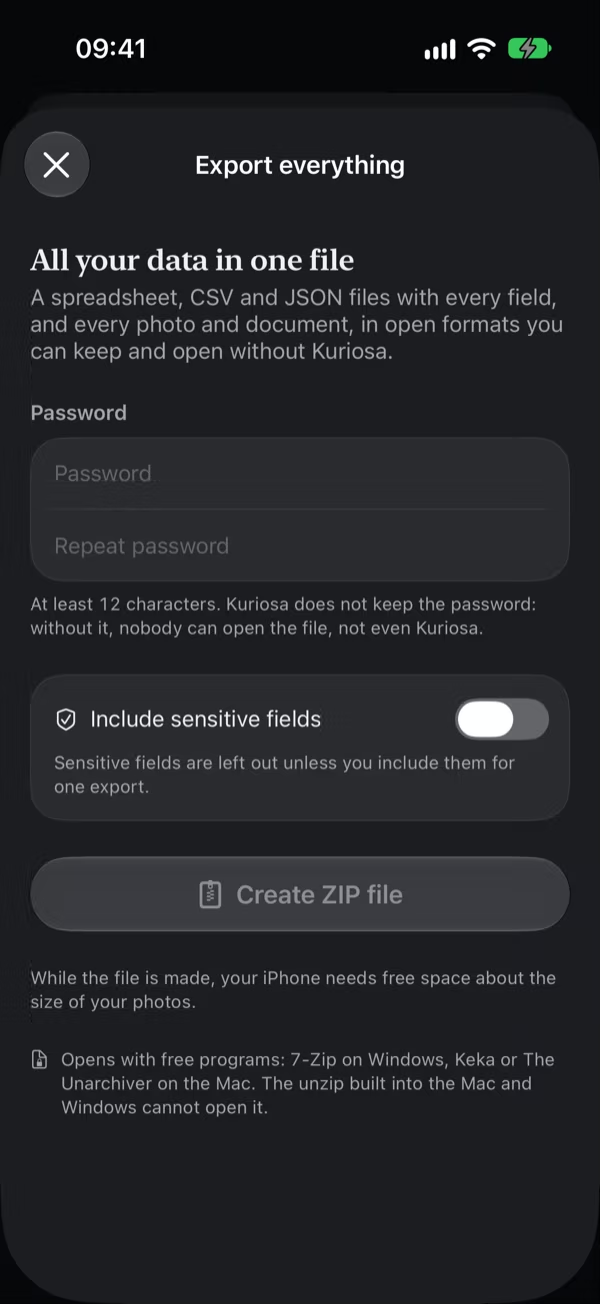
Your collection and your backups are encrypted, and they open in Kuriosa. So that your data stays readable without Kuriosa, for example if the app no longer exists or something stops working, Export everything … writes all of it in open formats: a spreadsheet, tables, and every photo and document, in one file that you keep.
Export everything
- Open Settings › Backup.
- Tap Export everything ….
- Choose a password of at least 12 characters and type it again under Repeat password.
- Tap Create ZIP file. A bar shows how far it is; Cancel stops it.
- Tap Share, or Save to Files to keep it in iCloud Drive, on a USB stick, or elsewhere.
Kuriosa does not keep the password. Without it, nobody can open the file, not even Kuriosa, so keep it somewhere safe. Export everything is free, also in the free version.
While the file is made, your iPhone needs free space about the size of your photos. Kuriosa deletes its own copy when you close the screen.
What the file holds
- Kuriosa.xlsx: a spreadsheet for Excel, Numbers, LibreOffice, or Google Sheets, with one sheet per collection and every field, and sheets for the wishlist, the journal, links, sets, places, and tags.
- CSV: the same tables as CSV files for any program.
- kuriosa.json: everything in one file for programs, the history of changes too.
- Photos and Files: every photo and document as Kuriosa keeps it, with cut-outs as PNG files.
- Read me.txt: what each part holds, in your language and in English.
The names inside the file are numbers, for example Photos/K-0001/1.jpg for the first photo of the piece with the inventory number K-0001. Anyone who has the file can read these names without the password, so they say nothing about your pieces. The spreadsheet tells which piece each number is and what each document was called.
Opening the file
The file is a ZIP file protected with AES-256 encryption. The unzip built into the Mac and into Windows cannot open it; these free programs can:
- On Windows: 7-Zip.
- On the Mac: Keka or The Unarchiver.
Open the file with one of them and type your password.
Sensitive fields
Sensitive fields such as serial numbers are left out, also from the history of changes in the file. To include them, turn on Include sensitive fields, confirm the warning, and unlock with Face ID or your passcode. Kuriosa asks every time.
Open a backup without Kuriosa
A backup also opens without Kuriosa, with your recovery key: the free page Open a backup without Kuriosa on kuriosa.app decrypts it in your browser, on your computer, and writes the same files as Export everything …. Nothing is sent anywhere.
You can download the page as one file and keep it next to your backups: it opens from your computer, also without internet and even if kuriosa.app is gone. How the backup file is built is described in full under Formats.